
07. The Most Popular Multi-Page Poster Formats
In the world of visual communication, size matters. Whether you are a teenager decorating a bedroom, a teacher preparing visual aids, or a business owner advertising a sale, a large poster commands attention in a way a standard sheet of paper simply cannot.
However, most of us are limited by the hardware we have at home or in the office: a standard A4 (or Letter) printer. The solution? Multi-page (tiled) printing. This technique involves splitting a large image into smaller sections, printing them on standard sheets, and assembling them into a cohesive masterpiece.
But how do you choose the right size? Let's dive into the most popular formats supported by RonyaSoft Poster Printer and how to achieve professional results.

The Anatomy of a Multi-Page Poster
When you decide to "go big," you aren't just arbitrarily enlarging an image. You are scaling it to fit a grid of standard paper sheets. Understanding these grids helps you choose the best format for your available wall space and image resolution.
Here is a breakdown of the most popular formats:

1. The Classic 2x2 (approx. A2 Size)
This is the entry-level giant. By utilizing just 4 sheets of A4 paper, you create a poster that is roughly equal to the A2 ISO standard. It is best for high-resolution photography, movie posters, and art prints for smaller rooms. It works because it doubles the dimensions of your standard print, quadrupling the area.
2. The Impact 3x3 (approx. A1 Size)
Stepping up to a 9-sheet grid, this format rivals the standard commercial posters you see in cinemas or retail stores. It is perfect for informational charts, intricate artwork, and high-impact advertisements. Expert Tip: When printing 3x3, image quality becomes crucial. Ensure your source file has a high DPI (dots per inch) to avoid pixelation.
3. The Large 4x3 (approx. A1+ Size)
Comprising 12 sheets, this rectangular format offers a wider field of view. It is ideal for landscapes, wide-angle photography, and detailed schematics or maps. This size dominates a wall and turns a standard digital photo into a mural-like experience.
4. The Horizontal Banner
Not all posters need to be boxy. The "strip" or banner format (4x1, 5x1, etc.) is perfect for text-heavy announcements, such as "Happy Birthday" banners, "Sale" signs, or panoramic landscape photos.
Why Use RonyaSoft Poster Printer?
You might wonder, "Can't I just do this in my printer settings?" While some printer drivers offer basic "poster" modes, they lack the precision and control required for a seamless finish.
RonyaSoft Poster Printer is engineered specifically for this task. It handles the heavy mathematical lifting of splitting the image, but more importantly, it manages the physical margins.
RonyaSoft Poster Printer Interface
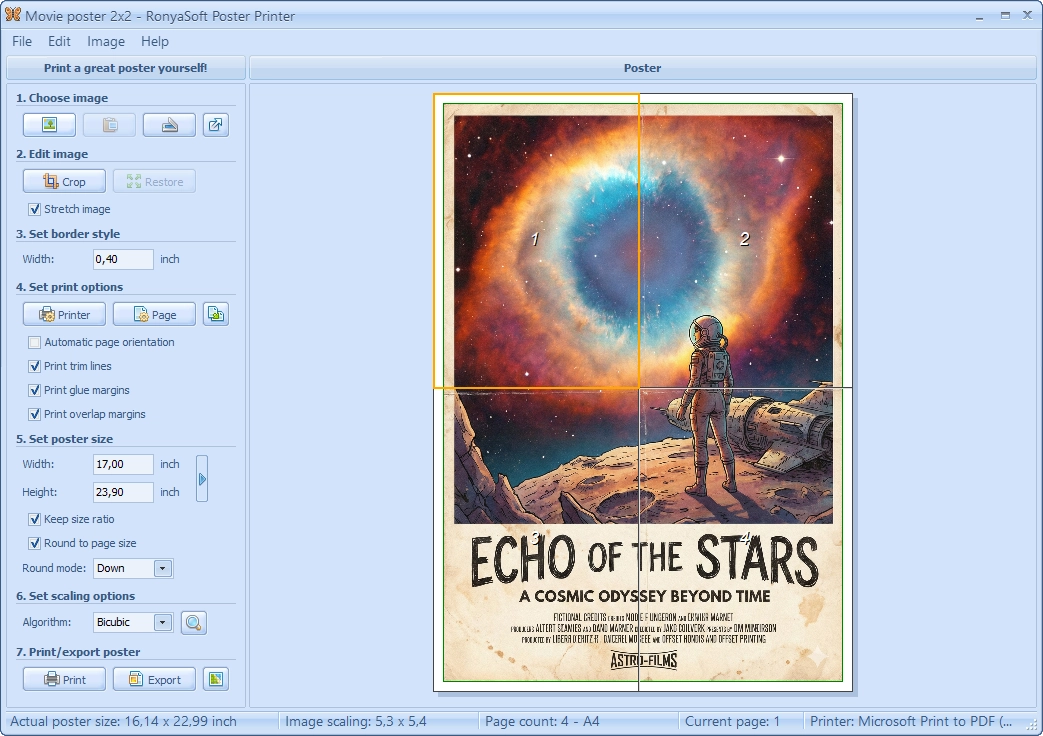
(Click to enlarge)
Key Advantages:
- Smart Overlaps & Glue Margins:
- Cut Lines:
- Scaling Algorithms:
Standard printers cannot print to the very edge of the paper. RonyaSoft calculates an "overlap" area. This ensures that when you cut and glue the sheets, the image aligns perfectly without white gaps or missing slices.
The software prints distinct guides, showing you exactly where to trim the paper, removing the guesswork.
We use high-quality resampling (like Bicubic, Bilinear, or Hermite) to smooth out edges when enlarging images, preventing the dreaded "blocky" look.
From Digital to Physical: The Assembly Process
Creating the poster is a journey from screen to reality. Let's look at a real-world example using a customized movie poster.
Poster Assembly Transformation

(Click to enlarge)
As seen in the image above, the software generates four distinct A4 pages with essential white borders. Here is the process:
- Print. Output the 4 sheets changing poster size setting in RonyaSoft Poster Printer.
- Trim. Using the printed guide lines, trim one edge of the overlap (usually the right and bottom edges of the overlapping sheets).
- Assemble. Apply adhesive to the uncut margin of the base sheet and overlay the trimmed sheet. The image will match up perfectly.
Complete Your Toolkit
If you don't have a ready-made image to print, don't worry. Our ecosystem includes RonyaSoft Poster Designer. This tool comes packed with templates for sales, holidays, parties, and funny signs. You can design your masterpiece from scratch or modify a template, and then seamlessly export it to the Poster Printer for large-scale output.
Related Articles & Tutorials
Want to become a printing pro? Check out these guides:
- How to Create a Banner from Scratch
- How to Print a Large Image on Multiple Pages
- Understanding Poster Sizes
Conclusion
You don't need a specialized wide-format plotter or an expensive trip to a print shop to visualize your big ideas. Whether you choose the classic 2x2 for a bedroom wall or a massive 4x3 for a presentation, the combination of standard A4 paper and RonyaSoft Poster Printer gives you the power to print without limits.
Download the free trial today and turn your standard printer into a poster-making machine!